First Look: MacroFactor Workouts 2026 Review by Expert
My first impressions as an exercise scientist: polished onboarding, promising options, and basic auto-progression; focus priorities and workout customization fall short

Key Takeaways
- Setup Is Smooth: Clean UI and detailed equipment options, but more options don’t necessarily equal better workouts.
- Focus Feature Underdelivers: Prioritized muscles often got one set or a single exercise despite being flagged for extra attention.
- Progression Is Basic: Auto progression adjusts weights and reps, but it appears limited to those metrics and lacks exercise rotation.
MacroFactor Workouts: My First Impressions as An Exercise Scientist
MacroFactor Workouts launched with a lot of promise: a polished UI, a program builder from developers with strong fitness credentials, and a list of features that sound legit on paper.
I installed the app, completed the setup, and let it generate a program so I could evaluate how well the app translates your inputs into a training plan that will actually build muscle and reduce fat.
Below I break down what works, what feels half-baked, and where the workout generator still needs a coach’s touch.
What Makes This Review Different?
These opinions come from an exercise scientist and app developer perspective. I evaluate workout customization, exercise selection, and progression the way a coach would, not just the surface polish.
Our team combines academic training with decades of coaching experience and practical testing. We've published 300+ articles and build an app focused on automated progressive overload and 27+ smart features, many of which you won't find anywhere else.
Please continue reading for a practical breakdown and recommendations.
Related:
- MacroFactor App Review 2025 by Independent Expert—Results, Price & More [In-Depth]
- Progressive Overload Workout Routine for Muscle Gain [Science-Based]
- MacroFactor Workouts: Jan 2026 App Launch, Features & Key Questions
In A Nutshell: MacroFactor Workouts Review
Your experience with MacroFactor Workouts will start strong: clean onboarding, granular equipment options, and an attractive program template. But the magic of any workout app is how well the generator respects your training priorities and progresses you over time. On that front I found inconsistencies.
With the options I punched in, I got a fully structured, three-day full body program that’s great for restarting training and building baseline strength. However, the way the app applied my“focus” requests and exercise choices felt like a surface-level filter rather than an intelligent reshaping of the plan.
Your program will probably get sensible warm-up logic and automated weight adjustments, but it may not give you the exercise swaps and targeted volume tweaks a coach would prescribe for faster, safer progress.
How The Onboarding Looks
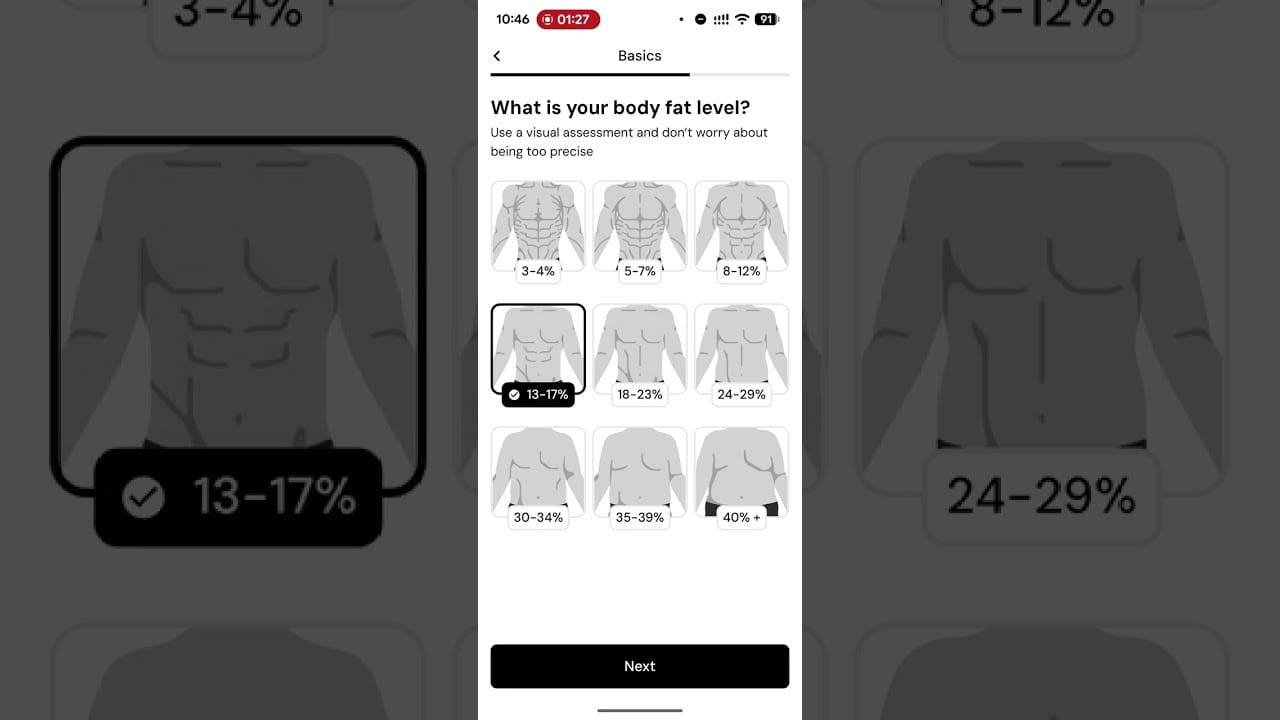
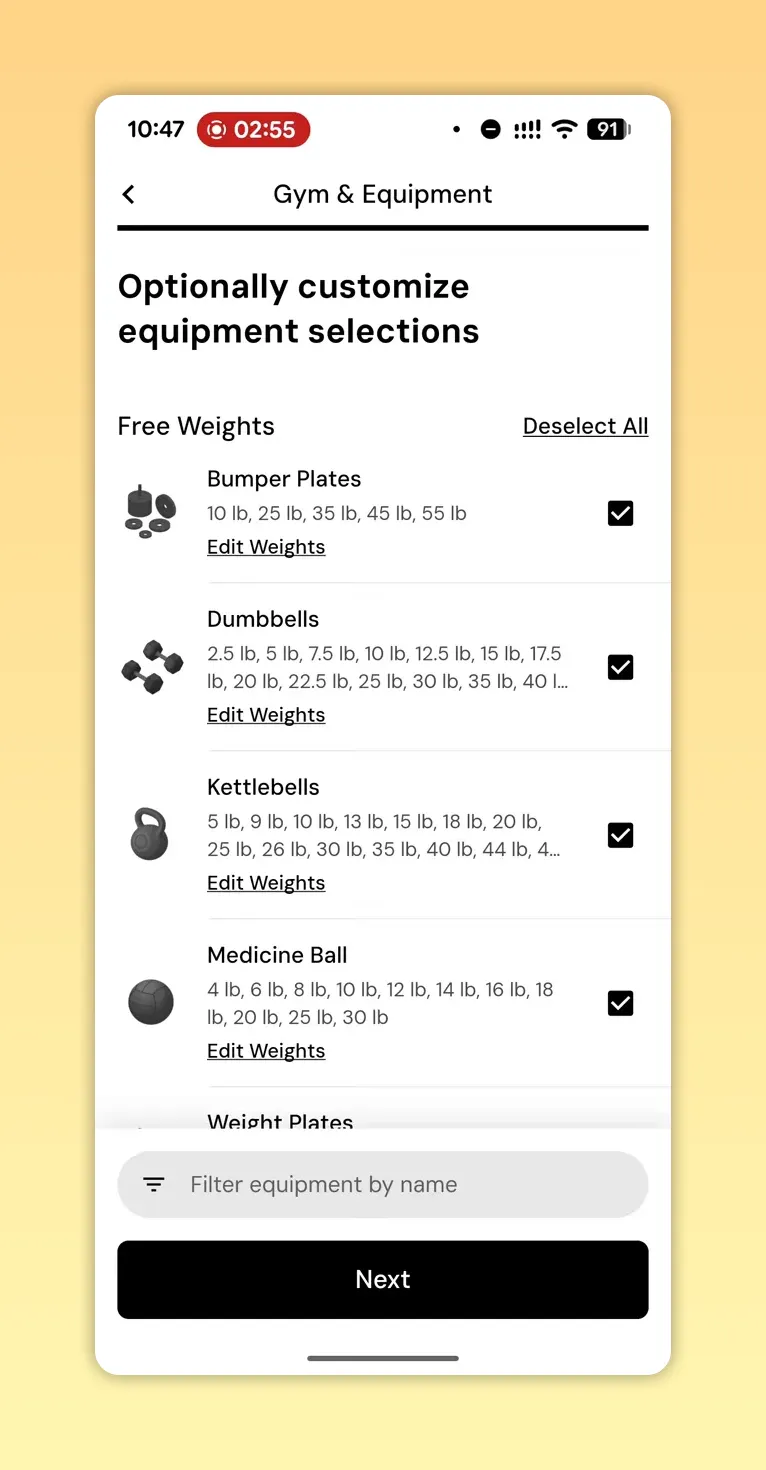
The onboarding is polished. The app asks expected questions: body fat visuals, training environment, equipment availability, and self-reported strength. The equipment selector is exhaustive — maybe too exhaustive.
Providing lots of equipment options is helpful for accuracy. But for most people, a handful of items cover 80 percent of progress: a couple of dumbbells, a barbell, a bench, and some pulling options. The long equipment list can give newcomers the impression that they need every piece to make progress, which is misleading.
What The Program Generator Gets Right
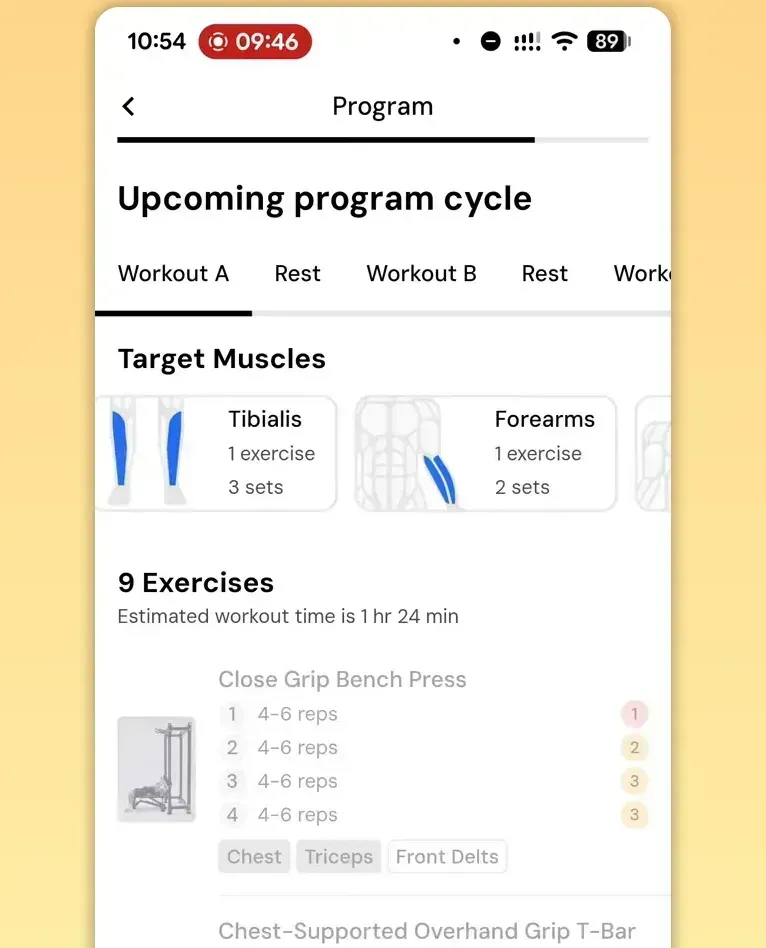
MacroFactor Workouts generates a clear program quickly. For my test it produced a three-days-per-week full-body split: Workout A, rest, Workout B, rest, Workout C, rest, rest. That’s a solid default for people returning to training and a smart choice for rapidly rebuilding work capacity and muscle mass.

The app also provides automated warm-up suggestions and an RIR-based intensity scale (1 to 6 reps in reserve). Those are useful features for consistent progression and managing day-to-day intensity.
Where The Program Logic Falls Short
The weakest part of the app right now is the workout-generation logic — specifically how it interprets and applies your priorities. The app has a “focus” or priority system where you assign focus points to body parts. That feature should increase the number of exercises, sets, or frequency for prioritized muscles. In practice I saw inconsistent results.
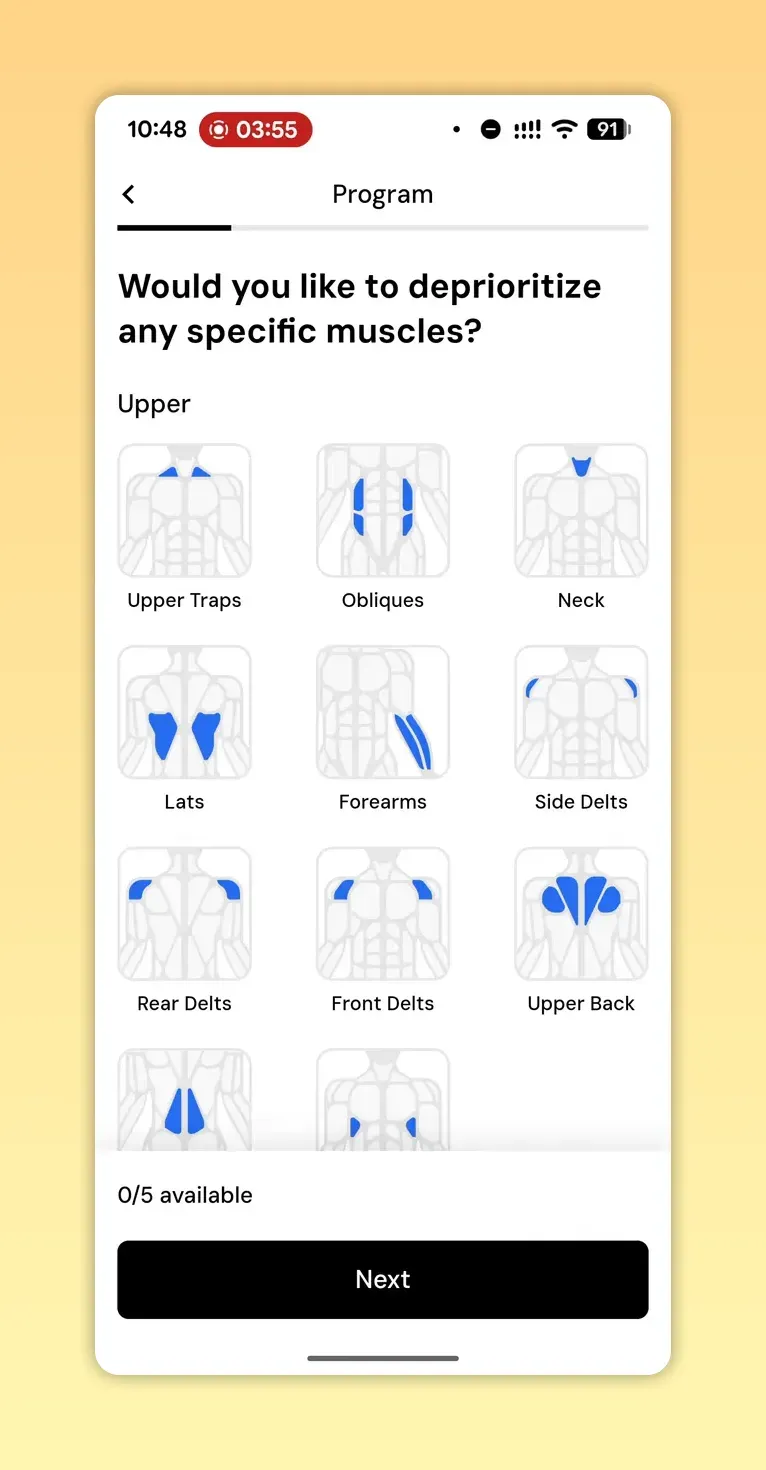
Example problems I found:
- Prioritized body parts sometimes got a single exercise or only 1.5 sets allocated. That does not meaningfully increase stimulus compared to non-prioritized muscles.
- I flagged some muscles to deprioritize. The app still included them with multiple sets in the same workout. Deprioritizing should reduce volume or frequency, but it didn’t reliably do that.
- The generator added highly specific accessory work (two tibialis exercises) that I never requested, while underdelivering for things I did prioritize like abs and specific chest or arm work.
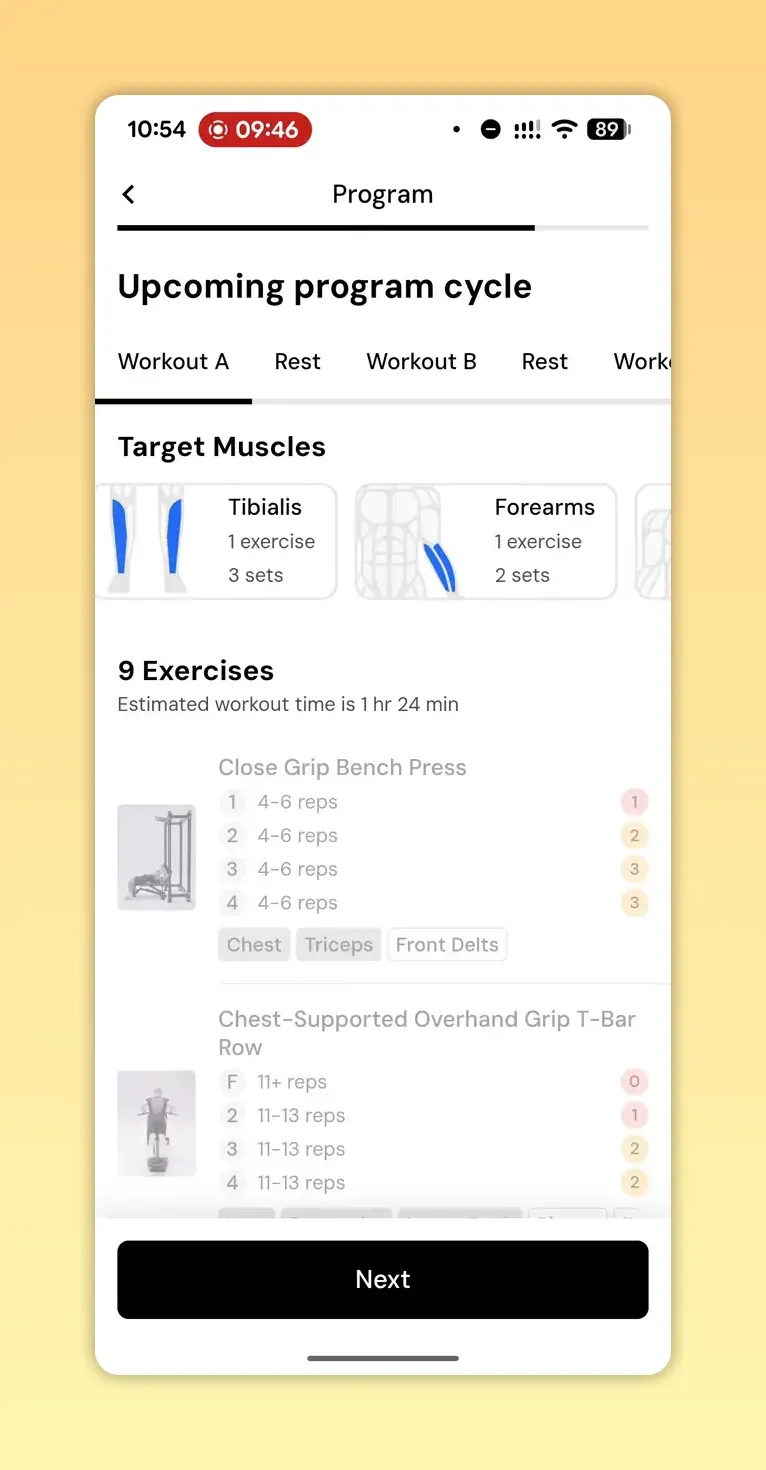
Put simply, the UI allows you to tell the program what to prioritize, but the program does not always honor those choices in a way that matters for hypertrophy or strength adaptation.
Progression And Periodization
The app offers automatic weight and rep progression and manages warm-ups intelligently. That’s a good baseline. But progression should be more than just adding weight or reps.
What’s missing:
- Planned exercise rotation. A good program swaps variations over weeks to manage joint stress and target muscles from different angles.
- Smart deload customization. The app has a block deload option (end-of-block lighter week), but I prefer targeted deloading on an exercise-by-exercise basis. A blanket deload can slow momentum for some lifts that still have room to progress. Targeted deloads can often make more sense (we use them in Dr. Muscle).
- Return-from-break logic. If you stop training for weeks, a phased return with lighter sessions and scaled intensity is the sensible approach; I didn’t see that clearly implemented yet.
These omissions mean the progression can feel a bit one-dimensional: weights and reps change, but exercise selection and periodization patterns don’t show the nuance you'd expect from an experienced coach or from more mature coaching apps.
Interface, Customization, And Practical Usability
The interface looks clean and most buttons do what you expect. Customization is broad: you can change exercises, sets, and equipment on nearly any part of the program. That flexibility is useful because you will almost certainly want to remove a few questionable accessory picks.
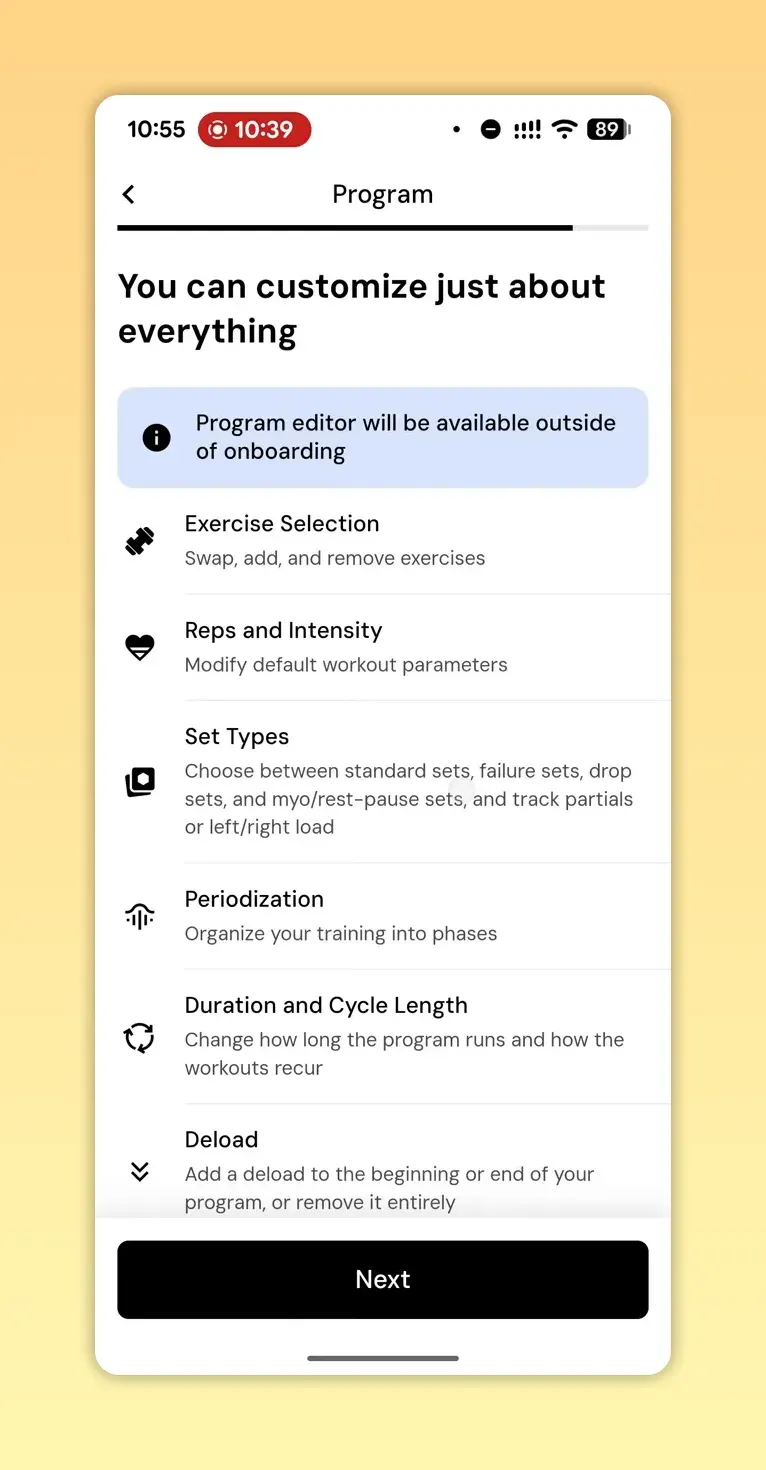
However, some elements are surprisingly rigid during the preview. I couldn’t always tap through every helpful explanation in the preview mode. Also, subscription gating blocks access to full functionality — I couldn’t fully test progression or long-term behavior without subscribing.
When MacroFactor Workouts Makes Sense For You
This app will suit someone who wants:
- A quick, attractive onboarding and a ready-made three-day full-body program.
- Automated warm-ups and simple auto-progression for weights and reps.
- An app interface with lots of niche equipment options for accurate exercise availability matching.
But it may not be the best fit if you want an app to deeply prioritize certain muscles, aggressively manage exercise rotation, or provide nuanced deloading and phased returns after breaks. Right now, that logic still feels basic.
My Honest Opinion On MacroFactor Workouts
I like the ambitions behind MacroFactor Workouts. The UI polish and attention to detail in onboarding are clear strengths. However, I expected more from a training app designed by people with strong coaching credentials. What matters most is whether the program generator responds to your training aims in a measurable way.
I think the app underutilizes the priority and focus settings. For instance, when I prioritized abs and de-emphasized serratus, the plan still gave similar volumes and odd accessory choices like elevated ankle dorsiflexion. That suggests the focus controls are either not well wired into the generation algorithm or they’re being applied superficially.
I respect differing philosophies. Some coaches prefer simple, consistent programming and leave the rest to execution. If their strategy is intentionally conservative, that’s fair. But the product blurs the line between conservative programming and not following user inputs, which can seem misleading or, at the very least, confusing.
Concluding On MacroFactor Workouts
MacroFactor Workouts nails the basics: clean onboarding, decent UI, automated warm-ups, and a sensible default training split that will get you moving and making progress. Where it needs work is the core program-generation logic — honoring your priorities, offering meaningful exercise rotation, and flexible deload strategies.
If you want an app that automates sensible progressive overload and smart periodization out of the box, consider tools that explicitly manage exercise rotation, phased returns, and exercise-specific deloading. For example, our app automates those elements and adjusts exercises, sets, and more as you progress. It has 27+ smart features, many of which you won't find anywhere else.
FAQ
What Is MacroFactor Workouts?
MacroFactor Workouts is a new training app designed to generate gym programs based on your equipment, goals, and self-reported strength. It offers automated warm-ups, auto progression for weight and reps, and a detailed equipment selector.
How Does MacroFactor Workouts Handle Progression?
Progression in MacroFactor Workouts adjusts weights and reps automatically and manages warm-ups intelligently. It currently appears limited to these metrics and does not reliably rotate exercises or implement more nuanced periodization.
Does the Focus Feature in MacroFactor Workouts Actually Prioritize Muscles?
In theory, the focus feature allows you to allocate priority to specific muscles, but in early testing the app often applied only minimal changes — one exercise or a small set change — which is unlikely to provide meaningful extra stimulus for prioritized muscles.
Is MacroFactor Workouts Worth Trying For Beginners?
Yes. MacroFactor Workouts provides a clear starting program and automated intensity guidance, which can help beginners build consistency and foundational strength. Expect to manually edit accessory choices until the generator matures.
How Much Does MacroFactor Workouts Cost?
The app uses a subscription model with a trial period available. Full access to progression and long-term program features is gated behind the subscription, so you’ll need to subscribe to fully evaluate long-term behavior.
Can MacroFactor Workouts Help You Build More Muscle?
MacroFactor Workouts can help build muscle if you follow the generated progressive overload and stay consistent. However, to maximize hypertrophy you may need more targeted volume for prioritized muscles and better exercise rotation than the app currently provides.
Final Note
MacroFactor Workouts shows a lot of promise but the program generator needs to better honor user priorities and include smarter exercise rotation; if you want an app that automates progressive overload, periodization, and exercise swaps, Try Dr. Muscle AI—it's free.